Two Commands, Zero Config
On your router machine:
pip install ollama-herd
herd
On each device running Ollama:
herd-nodeEach node discovers the router via mDNS and starts sending heartbeats. No config files, no YAML, no Docker, no Kubernetes.
Need to skip mDNS? Use herd-node --router-url http://router-ip:11435
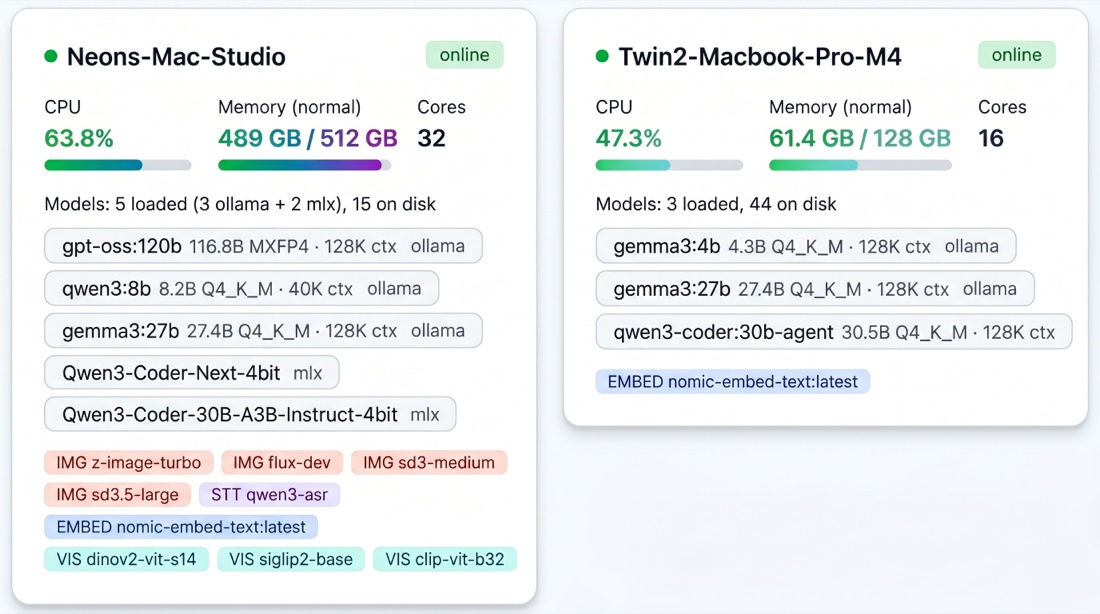
herd-node starting, the router picks up each device and you see it here, memory, cores, loaded models, available services. One view across the whole fleet.
What Happens When a Request Arrives
Every request, whether it's a chat completion, an embedding, an image generation, or a transcription, passes through a five-stage pipeline:
Elimination
The router immediately removes nodes that can't serve the request: offline or not heartbeating, model not on disk, not enough memory to load the model, or hard-paused (in a meeting, critical memory pressure, or low availability). If nothing survives, the request enters a holding queue instead of failing. The router retries as node states change.
Scoring
Every surviving node gets scored across 8 weighted signals. A hot model on an idle Mac Studio with plenty of memory headroom scores 80+. A cold model on a busy MacBook with rising CPU usage scores under 20. The highest score wins.
Queue and Execute
The winning node receives the request in its dedicated queue. Each node+model pair has its own queue with dynamic concurrency, the router knows how many parallel requests each device can handle without degrading performance.
Pre-Warm
If the primary node's queue is getting deep, the router proactively loads the same model on the runner-up node. By the time the next request arrives, it's already hot.
Rebalance
A background process runs every 5 seconds, moving queued requests from overloaded nodes to nodes with spare capacity, but only where the model is already loaded, avoiding cold-load cascades.
Scoring Signals
Every surviving node gets scored across 8 weighted signals:
| Signal | What It Measures | Weight |
|---|---|---|
| Model thermal state | Is the model already loaded (hot) or needs loading (cold)? | Up to +50 |
| Memory fit | How comfortably does the model fit in available memory? | Up to +20 |
| Queue depth | How many requests are already waiting on this node? | Up to -30 |
| Estimated wait time | Using real latency history, how long until this request starts? | Up to -25 |
| Role affinity | Does this machine match the model's weight class? | Up to +15 |
| Availability trend | Is this device freeing up or getting busier? | Up to +10 |
| Context fit | Can this node handle the requested context size? | Up to +10 |
| Session affinity | Does this node already hold the conversation's warm cache? | Up to +20 |
The Fleet Gets Smarter Over Time
Ollama Herd isn't static. It learns:
- Latency tables track per-node, per-model response times in SQLite. After a few days, the scoring engine knows exactly how fast each machine runs each model.
- Capacity learner builds a 168-slot weekly behavioral model (one slot per hour). After a month, it knows your MacBook is busy Tuesday mornings and your Mac Mini is idle on weekends.
- Meeting detection (macOS) pauses nodes when cameras or microphones are active. No inference competes with your Zoom calls.
- App fingerprinting classifies your workload (idle/light/moderate/heavy) without reading app names. Heavy workloads reduce a node's memory ceiling, shifting requests elsewhere.
- Context optimizer tracks actual token usage per model and auto-adjusts context windows. Most models allocate far more context than they use, Herd right-sizes them to free VRAM for additional models.
All state persists across restarts. A fleet running for a month makes better routing decisions than one running for a day.
Multimodal Routing
The router handles five model types, each routed to the right node:
| Model Type | Protocol | Example |
|---|---|---|
| LLM inference | OpenAI + Ollama API | Llama 3, Qwen 3, DeepSeek |
| Embeddings | Ollama API | nomic-embed-text |
| Image generation | Custom API | FLUX via mflux (Apple Silicon) |
| Speech-to-text | Custom API | Qwen3-ASR via MLX (Apple Silicon) |
LLM and embedding requests work on all platforms. Image generation and speech-to-text require Apple Silicon and are gracefully unavailable on other hardware.
API Compatibility
Point any existing tool at the router, no code changes needed:
from openai import OpenAI

client = OpenAI(base_url="http://router-ip:11435/v1", api_key="not-needed")
response = client.chat.completions.create(
    model="llama3.3:70b",
    messages=[{"role": "user", "content": "Hello!"}],
    stream=True,
)
Or use the Ollama API directly:
curl http://router-ip:11435/api/chat -d '{
  "model": "llama3.3:70b",
  "messages": [{"role": "user", "content": "Hello!"}]
}'
The router speaks both OpenAI and Ollama protocols. Works with Open WebUI, LangChain, CrewAI, AutoGen, Aider, Continue.dev, LlamaIndex, LiteLLM, and any other OpenAI-compatible client.
What You Get
- Zero wait time, requests run on the first available machine, not in a queue
- Zero model swapping, every model stays loaded on its home machine
- Zero babysitting, meetings, heavy workloads, and thermal limits handled automatically
- Zero client changes, point your existing tools at one URL
- Compounding intelligence, the longer it runs, the better the routing decisions