Every machine you own.
One local AI endpoint.
Macs, Linux servers, and Windows PCs, NVIDIA or not. A 70B model on the Mac Studio, coding models on the Linux box with the RTX card, embeddings on the Windows desktop, all through one endpoint. Zero config, zero cost.
exo splits one model across several machines. Herd sends whole requests to the right machine. Which one do you need?
See your whole fleet at a glance
Every node, every model loaded, every image-gen / speech-to-text / embedding / vision service ready to route, one view. No ops console to build. No Grafana to wire up.
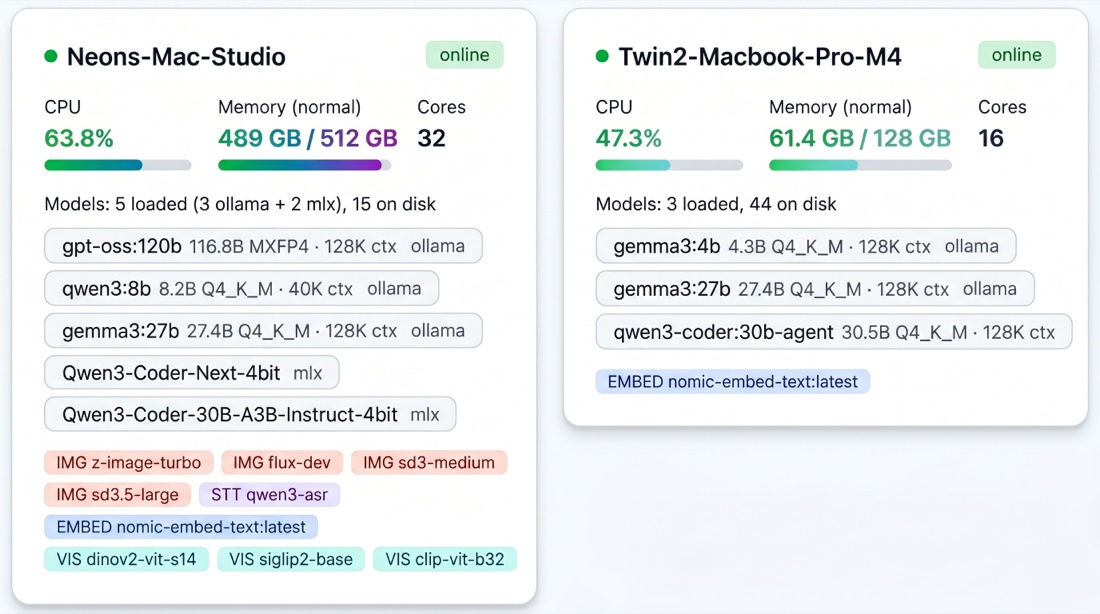
gpt-oss:120b and MLX coding models, and a MacBook Pro M4 running Gemma. Both visible from one URL. Linux and Windows nodes show up as the same kind of card.
You switched to local. Now you're stuck on one machine.
Sound familiar?
Cloud API costs are bleeding you dry
You're running Aider, CrewAI, OpenClaw, or other AI agents. Cloud API bills hit hundreds a month and keep climbing. Every token costs money. Every request leaves your network.
Local LLMs freed you, partially
You switched to Ollama on your laptop, or on that one box with a GPU. Free, private, fast. But now you're constrained to a single device. Requests queue up behind each other. Larger models need more memory than that machine has. Agents stall waiting for inference.
Meanwhile, your other devices sit idle
The Mac Studio with 256GB. The Linux server with an RTX card under the desk. The Windows gaming PC that sits idle all day. The old MacBook Air in a drawer. All that memory and compute, doing nothing. Herd connects them all into one endpoint. Each machine serves the models you put on it, and every request goes to the one that has its model ready. Every machine contributes what it can.
Built for people with more machines than they're using
If you have a few machines that can run Ollama (a Mac here, a Linux box there, maybe a Windows PC with a GPU) and one of them is always the bottleneck, Herd is for you. Here are a few of the fleets people run it on.
Solo developers
You've got a laptop, a desktop, and maybe a GPU box or a Mac Mini in a drawer. Point Claude Code and your agents at one endpoint and let Herd pick the right machine every time.
Agent-heavy workflows
Aider, CrewAI, OpenClaw, and a dozen background agents all hitting local models at once. Herd spreads the load so nothing stalls waiting in a queue.
Small teams and offices
Everyone points their tools at one URL. Herd handles contention, shows who's using what, and keeps the shared GPU server or Mac Studio from melting down.
Creative studios
Image generation and transcription on the Macs, a big model on the Linux server. Herd sends each kind of job to the machine that can actually do it.
Research labs
Mixed hardware, mixed workloads, shared fairly. Embeddings for RAG, vision models, and chat all routed by capability instead of guesswork.
Home lab enthusiasts
You already run Ollama on everything you own: the Mac Mini, the Proxmox box, the gaming PC. Herd turns the pile into one smart cluster in two commands, with no Kubernetes in sight.
See detailed setups and example configs on the use cases page.
Everything your fleet needs
Intelligent routing that gets smarter the longer it runs. Every component exists to serve one thing: getting the best response as fast as possible.
8-Signal Scoring Engine
Whether the model is already loaded (hot, warm, or cold), memory fit, queue depth, latency history, role affinity, availability trend, context fit, and session affinity. Every request goes to the best machine.
Auto-Retry & Fallbacks
Transparent retry on node failure before the first chunk. Client-specified fallback models. Holding queue when all nodes are busy.
Zero-Config Discovery
mDNS auto-discovery. Nodes find the router on the LAN automatically. No config files, no service registries, no manual IP addresses.
Real-Time Dashboard
8-tab live dashboard with SSE. Fleet overview, trends, model insights, per-tag analytics, benchmarks, health, recommendations, and settings. Multimodal type badges and per-node capability matrix. All backed by SQLite.
Adaptive Capacity Learning
Opt-in 168-slot behavioral model learns each device's weekly patterns. On macOS, meeting detection pauses inference when you're on a call.
Your Agents, Your Whole Fleet
Ollama can point Claude Code or Codex at one machine. Herd points them at every machine you own, and picks the right one per request. Four wire protocols on one endpoint (OpenAI Chat Completions, OpenAI Responses, Anthropic Messages, native Ollama) mean your existing clients, frameworks, and agent pipelines come along unchanged.
Multimodal Routing
Route LLMs, embeddings, image generation, speech-to-text, and vision across the fleet. Capability-aware: image requests only go to nodes with an image backend, transcription only to Apple Silicon nodes with Qwen3-ASR.
Thinking Model Support
Auto-detects chain-of-thought models like DeepSeek-R1 and inflates token budgets by 4×. Diagnostic headers show exactly how thinking tokens were spent.
Smart Benchmark
Auto-discovers fleet capabilities, selects an optimal model mix to fill available memory, and benchmarks LLMs, embeddings, image gen, STT, and vision together. Per-model and per-node charts.
Dynamic Context Optimization
Measures actual token usage per model, recommends optimal context sizes, and auto-adjusts to reclaim memory lost to oversized context windows. Most models use under 5% of allocated context, Herd fixes that.
Beyond text inference
One fleet, five model types. Every request routes to a node with the right capabilities.
LLM
Chat, completion, reasoning. Smart routing by memory fit and model size.
Embeddings
Vector search and RAG pipelines. Route to nodes with embedding models loaded.
Image Generation
Text-to-image with an OpenAI-compatible endpoint. mflux and DiffusionKit run on Apple Silicon; Ollama's native image models go through the normal Ollama path.
Speech-to-Text
Audio transcription routed to Apple Silicon nodes running Qwen3-ASR on MLX. One upload endpoint.
Vision
Image understanding via multimodal models. Send images with prompts, get text descriptions and analysis.
Runs anywhere Ollama runs. Apple Silicon gets extras.
Routing, scoring, discovery, the dashboard, and all four APIs work the same on a Mac, a Linux server, or a Windows PC, with or without an NVIDIA GPU. Apple Silicon Macs add the MLX backend, native image generation, and speech-to-text.
| Works on macOS, Linux, and Windows | Apple Silicon / macOS only |
|---|---|
| LLM routing, 8-signal scoring, queues, auto-retry | MLX backend (mlx: models) |
| Embeddings, vision models | Image generation via mflux and DiffusionKit |
| mDNS discovery, dashboard, traces, health checks | Speech-to-text (Qwen3-ASR on MLX) |
| OpenAI, Ollama, Anthropic Messages, and Responses APIs (Claude Code and Codex) | Meeting detection (camera and mic) |
| Tool-schema fixup and context management (router-side) | Tool-call JSON repair (MLX models) |
| Ollama's native image models |
Memory-pressure detection works on macOS and Linux, not Windows.
Memory fit is scored against each machine's system RAM. Herd does not read GPU utilization or VRAM, so on a machine with a discrete GPU, pick models that fit its card.
8 signals. Every request.
The scoring engine evaluates every available node on 8 dimensions before routing. The system learns from every request and improves over time. One of those dimensions is session affinity, which is why your second message doesn't re-read the whole conversation: a follow-up goes back to the machine that still holds your warm cache, instead of paying full prefill somewhere else.

Your machines aren't servers. Herd knows it.
A rack server is always ready. A laptop or a desktop is somebody's actual computer. It joins meetings, runs builds, renders video, and plays games. Herd treats every machine as what it really is, a workstation with a life of its own. Turn on capacity learning (herd-node --learn-capacity) on the machines people use every day and it schedules around the person using them.
Meeting detection (macOS)
Camera or mic goes live and Herd stops routing to that Mac until the call ends. It won't land inference on the laptop you're presenting from.
Heavy-workload awareness
A big build, a video render, or a game shows up as sustained CPU and memory load. Herd classifies it from resource use (never app names) and shrinks that machine's share, so requests route elsewhere.
Memory pressure
A machine under critical memory pressure (as reported by macOS or Linux) drops out of the running automatically, with no config and no babysitting.
Learned weekly rhythm
Herd builds a 168-slot model of when each device is usually free, then quietly favors the machines that tend to be idle right now.
Every other local router treats your machines as interchangeable endpoints. Herd is the only one built to schedule around the people using them.
Request flow
From client request to streamed response in milliseconds. Every step is traced, logged, and queryable.
Request arrives
Client hits any endpoint, chat completion, image generation, transcription, or embeddings. The request is normalized and routed by type.
Eliminate & score
The router drops nodes that can't serve the request (offline, model missing, won't fit in memory, under critical memory pressure, or paused), scores the survivors on 8 signals, and selects the best. Fallback models are tried if the primary isn't available.
Queue & dispatch
The request enters the winner's node:model queue with dynamic concurrency. Every 5 seconds in the background, the router pre-warms the runner-up when a queue gets deep and moves waiting requests to nodes that already have the model loaded.
Stream & retry
The streaming proxy forwards to Ollama. If the node fails before the first chunk, auto-retry kicks in with a different node. Format conversion (SSE / NDJSON) is transparent.
Learn & trace
Every request is traced to SQLite. Latency data feeds back into the scoring engine. The fleet gets smarter with every request it serves.
Point Claude Code at your own hardware
Ollama Herd speaks the Anthropic Messages API. One env var redirects Claude Code CLI to your local fleet, agentic coding with your models, your hardware, your data. No rate limits, no per-token bills, no prompts leaving your network.
Includes three-layer context management that fixes the "Claude Code breaks at 30K tokens" failure mode on local coding models. No model map to configure: each claude-* request auto-routes to the best model you have loaded, and you only set FLEET_ANTHROPIC_MODEL_MAP if you want to pin a specific tier.
Ollama itself can now point Claude Code at a single machine (ollama launch claude), and for one machine that is a great option. Herd is for when you have a fleet: it routes across every machine, keeps long agentic sessions alive with context management that the single-node path does not have, and maps each Claude tier to a different local model.
And Codex runs on the same fleet
Codex dropped Chat Completions in February 2026 and speaks only the Responses API, which is why most "point Codex at a local model" advice no longer works. Ollama Herd serves the Responses API directly, so one provider block in ~/.codex/config.toml puts Codex on your whole fleet. The CLI and the Codex desktop app read the same file, so it covers both.
No model map needed: whatever id Codex sends auto-routes to the best coding model you have loaded. Verified end to end on a Mac fleet on real agentic tasks, fixing bugs and creating files, with Codex running the test suite itself. The same routing works on Linux and Windows nodes.
Works with everything
One base_url change connects any framework. Ollama Herd is the orchestration layer, not a replacement.
And it works on top of the inference stack you already run. Herd routes to Ollama and MLX out of the box, on Macs and on Linux or Windows machines. If one model is too big for any single machine, run a sharding tool like exo for that model alongside it. Herd is the layer above your runtimes, not a replacement for any of them. Nothing to rip out, nothing to migrate.
Any client that supports a custom OpenAI, Ollama, or Anthropic Messages base URL works out of the box.
Beyond LLMs, it also routes image generation (FLUX via mflux) and speech-to-text (Qwen3-ASR) to capable nodes.
Wondering about LM Studio's LM Link? LM Link connects your LM Studio installs to each other. Ollama Herd routes across your whole team's mixed fleet (Mac, Linux, Windows, any Ollama or MLX node) with scoring, context management, and team admin. See the detailed comparison →
The fleet that works while you sleep
Multimodal routing, smart benchmarking, and dynamic context optimization are shipped. Now we're building an agentic router, a fleet that doesn't just wait for requests, but generates its own work, learns your patterns, and uses idle compute proactively.
Your company's computers are an untapped AI platform
Hundreds of laptops and desktops, Macs and Windows PCs, plus the Linux GPU servers already in the rack. Sitting idle during meetings, after hours, and weekends. Ollama Herd turns your existing hardware into a private AI compute platform, LLM inference, embeddings, image generation, and transcription, at zero additional cost.
SSO, RBAC, audit logging, compliance dashboards, fleet management, and SLA support. Everything enterprises need to run a full AI stack on the hardware they already own.
Contact Us →Your hardware deserves
an orchestrator
Stop leaving compute on the table. Start herding.