Two Commands, Zero Config
On your router machine:
pip install ollama-herd
herd
On each machine running Ollama (macOS, Linux, or Windows):
herd-nodeEach node discovers the router via mDNS and starts sending heartbeats. No config files, no YAML, no Docker, no Kubernetes.
Need to skip mDNS? Use herd-node --router-url http://router-ip:11435
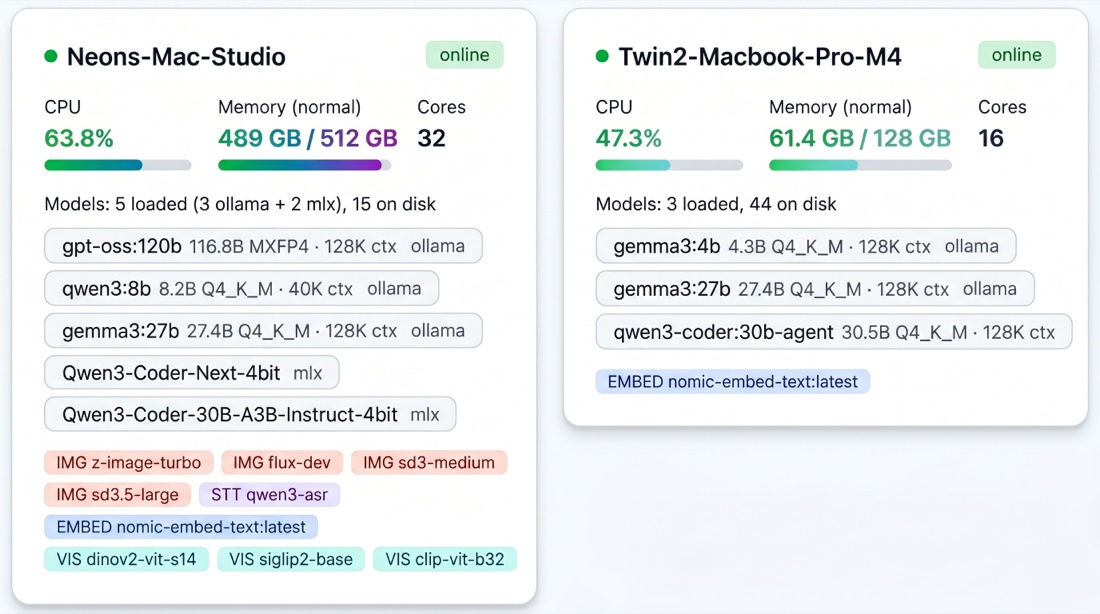
herd-node starting, the router picks up each device and you see it here, memory, cores, loaded models, available services. One view across the whole fleet.
What Happens When a Request Arrives
Every model request, whether a chat completion, a vision prompt, or an Ollama embedding, on any of the four wire protocols, passes through a five-stage pipeline. Image generation, speech-to-text, and the native text-embedding service take a simpler path: the router picks the least busy node that offers the service, by free memory and CPU load.
- 1. Eliminate nodes that cannot serve this model right now
- 2. Score the survivors on 8 signals; the highest score wins
- 3. Queue on the winner's own
node:modelqueue - 4 and 5, in the background every 5 seconds: pre-warm the runner-up and rebalance deep queues
Elimination
The router immediately removes nodes that can't serve the request: offline or not heartbeating, model not on disk, not enough memory to load the model (judged against system RAM), critical memory pressure, or hard-paused by opt-in capacity learning (in a meeting on macOS, sustained heavy CPU, low availability, or still in its first 7 days of observation). If nothing survives, the request enters a holding queue instead of failing: the router rescores it every 2 seconds for up to 30 seconds as node states change.
Scoring
Every surviving node gets scored across 8 weighted signals. A hot model on an idle machine with plenty of memory headroom, say a Mac Studio or a Linux server, scores 80+. A cold model on a busy laptop with rising CPU usage scores under 20. The highest score wins.
Queue and Execute
The winning node receives the request in its dedicated queue. Each node+model pair has its own queue with dynamic concurrency, the router knows how many parallel requests each device can handle without degrading performance.
Pre-Warm
If the primary node's queue is getting deep (3 or more requests queued or running, checked every 5 seconds), the router proactively loads the same model on the runner-up node. By the time the next request arrives, it's already hot.
Rebalance
A background process runs every 5 seconds, moving queued requests from overloaded nodes to nodes with spare capacity, but only where the model is already loaded, avoiding cold-load cascades.
Scoring Signals
Every surviving node gets scored across 8 weighted signals:
| Signal | What It Measures | Weight |
|---|---|---|
| Model warmth | Is the model already loaded (hot) or needs loading (cold)? | +50 loaded, +30 unloaded in the last 30 minutes, +10 on disk |
| Memory fit | How comfortably does the model fit in available system memory? | Up to +20 |
| Queue depth | How many requests are already waiting on this node? | Up to -30 |
| Estimated wait time | Using real latency history, how long until this request starts? | Up to -25 |
| Role affinity | Does this machine match the model's weight class? | Up to +25 (scaled by memory bandwidth) |
| Availability trend | Is this device freeing up or getting busier? (Only nodes with capacity learning turned on) | Up to +10 |
| Context fit | Can this node handle the requested context size? | +15 to -15 (negative when the prompt would overflow) |
| Session affinity | Does this node already hold the conversation's warm cache? | Up to +20 |

The Fleet Gets Smarter Over Time
Ollama Herd isn't static. It learns:
- Latency tables track per-node, per-model response times in SQLite. After a few days, the scoring engine knows exactly how fast each machine runs each model.
- Capacity learner (opt-in,
herd-node --learn-capacity) builds a 168-slot weekly behavioral model (one slot per hour). After a month, it knows your laptop is busy Tuesday mornings and the Windows desktop is idle on weekends. - Meeting detection (macOS, part of capacity learning) pauses nodes when cameras or microphones are active. No inference competes with your Zoom calls.
- App fingerprinting (part of capacity learning, all platforms) classifies your workload (idle/light/moderate/heavy) without reading app names. Heavy workloads reduce a node's memory ceiling, shifting requests elsewhere.
- Context optimizer tracks actual token usage per model and auto-adjusts context windows. Most models allocate far more context than they use, Herd right-sizes them to free memory for additional models.
All state persists across restarts. A fleet running for a month makes better routing decisions than one running for a day.
Multimodal Routing
The router handles five model types, each routed to the right node:
| Model Type | Protocol | Example |
|---|---|---|
| LLM inference | OpenAI + Ollama API | Llama 3, Qwen 3, DeepSeek |
| Embeddings | Ollama API | nomic-embed-text |
| Image generation | Custom API + OpenAI images | FLUX via mflux, SD 3.5 via DiffusionKit (Apple Silicon); Ollama native image models |
| Speech-to-text | Custom API | Qwen3-ASR via MLX (Apple Silicon) |
| Vision | OpenAI + Ollama API | Gemma3, LLaVA, Llama3.2-Vision |
LLM, embedding, and vision requests work on every platform, NVIDIA GPU or not. Speech-to-text and mflux/DiffusionKit image generation need Apple Silicon; Linux and Windows nodes simply don't advertise them, and the router sends those requests to a Mac that does. Ollama's native image models go through the normal Ollama path.
API Compatibility
Point any existing tool at the router, no code changes needed:
from openai import OpenAI

client = OpenAI(base_url="http://router-ip:11435/v1", api_key="not-needed")
response = client.chat.completions.create(
    model="llama3.3:70b",
    messages=[{"role": "user", "content": "Hello!"}],
    stream=True,
)
Or use the Ollama API directly:
curl http://router-ip:11435/api/chat -d '{
  "model": "llama3.3:70b",
  "messages": [{"role": "user", "content": "Hello!"}]
}'
The router speaks OpenAI Chat Completions, OpenAI Responses (Codex), Anthropic Messages (Claude Code), and native Ollama. Works with Open WebUI, LangChain, CrewAI, AutoGen, Aider, Continue.dev, LlamaIndex, LiteLLM, and any other OpenAI-compatible client.
What You Get
- Zero wait time, requests run on the first available machine, not in a queue
- Zero model swapping, every model stays loaded on its home machine
- Zero babysitting, memory pressure handled automatically, plus meetings and heavy workloads once capacity learning is on
- Zero client changes, point your existing tools at one URL
- Compounding intelligence, the longer it runs, the better the routing decisions